
🎉 Excited to release the create-guten-block toolkit today. In this post, I am going to share what is create-guten-block (cgb), what is the motivation & philosophy behind building this dev-toolbox, and the story of how I am releasing it to the public after ~200 commits and ~90 version releases. Let’s start with intro first…
🙌 Introducing Create Guten Block!

create-guten-block (🌟 at GitHub for updates) is a zero-configuration dev-toolkit (#0CJS) to develop WordPress Gutenberg blocks in a matter of minutes without configuring React, Webpack, ES6/7/8/Next, ESLint, Babel, etc.
Create Guten Block is not like other starter-kits or boilerplates. It’s a developer’s toolbox which is continuously updated. Since it has zero-configuration, you can always update it without any changes in your code. That’s actually why I built it.
🚀 create-guten-block is:
- 🥞 Versioned ✓
- 🤠 Updatable ✓
- 🗃 Set of sane-defaults ✓
- 🐎 ONE single
cgb-scriptsdependency ✓
But what is it?!

What’s Included?
Your dev-environment will have everything you need to build a modern next-gen WordPress Gutenberg plugin:
- React, JSX, and ES6 syntax support.
- Webpack dev/production build process behind the scene.
- Language extras beyond ES6 like the object spread operator.
- Auto-prefixed CSS, so you don’t need
-webkitor other prefixes. - A build script to bundle JS, CSS, and images for production with source-maps.
- Hassle-free updates for the above tools with a single dependency
cgb-scripts.

Philosophy
- One Dependency: There is just one build dependency. It uses Webpack, Babel, ESLint, and other amazing projects, but provides a cohesive curated experience on top of them.
- No Configuration Required: You don’t need to configure anything. A reasonably good configuration of both development and production builds is handled for you so you can focus on writing code.
- No Lock-In: You can
ejectto a custom setup at any time. Run a single command, and all the configuration and build dependencies will be moved directly into your project, so you can pick up right where you left off.

Why create-guten-block?
Well, it’s really hard to configure things like Webpack, React, ES 6/7/8/Next, ESLint, Babel, etc. before you — even start writing — a Hello WorldGutenberg block. Then there’s the fact that you have to maintain and constantly update your configuration with all the new tools and growth in the JavaScript community — that’s not an easy thing to do.
create-guten-block hides all this configuration away in an optimized package that we call cgb-scripts. This package is the only dependency in your projects. We keep cgb-scripts up to date while you go ahead and create the next best WordPress themes and plugins.
So, that’s what I dreamt about for the next couple of months. How do I solve this problem for the WordPress community, eh?
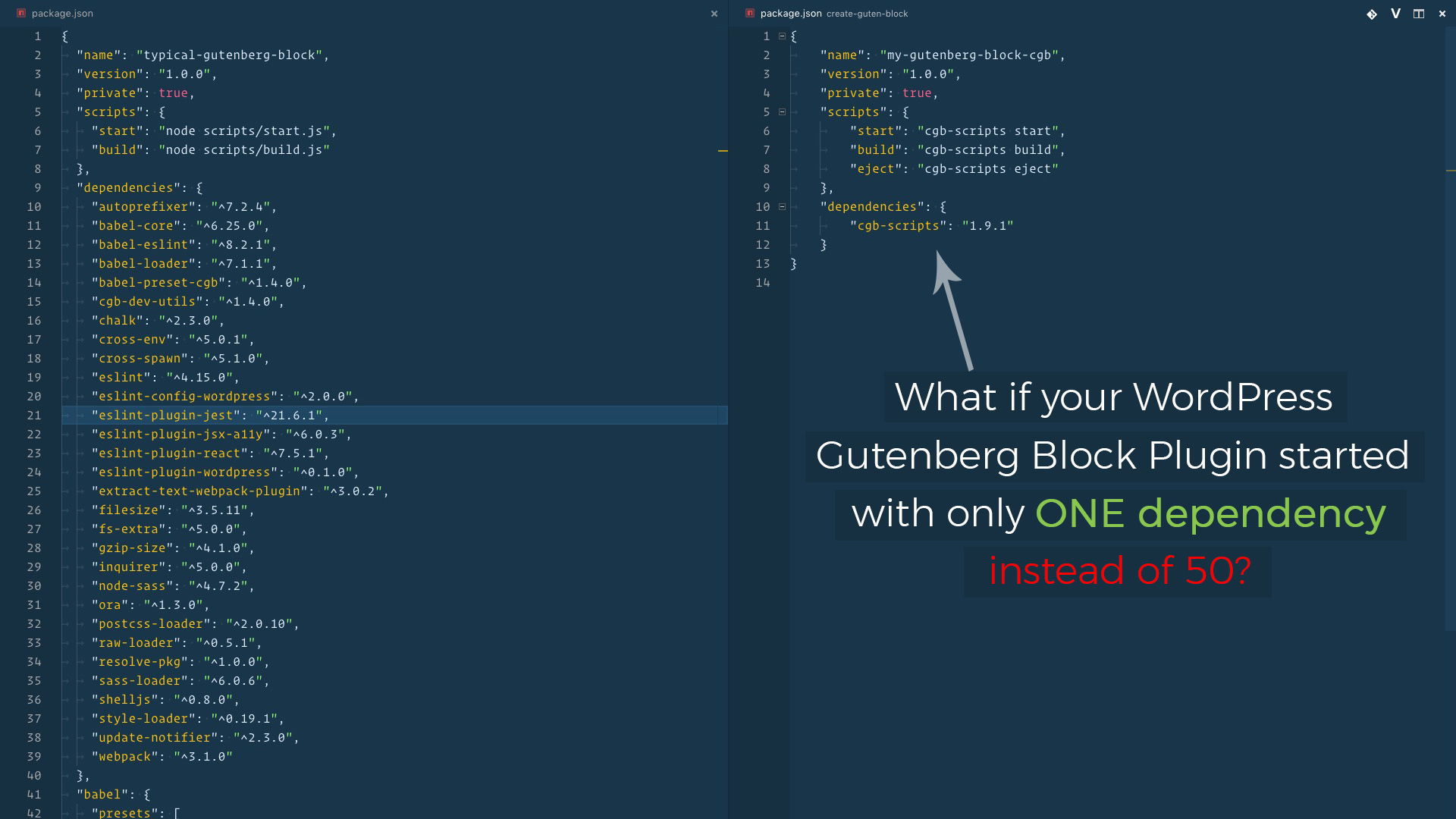
After building WPGulp and Gutenberg Boilerplate and lot of other open source software that thousands of developers are using — I started receiving lots of feedback on how it’s limiting in its architecture which is complex — and by the way, these boilerplates went stale quite a few times.
I knew this was not right.
create-guten-block! Enough talk, let’s stop it right here and actually explore the toolkit.
<
div>
GETTING STARTED!
It’s really easy to get started with create-guten-block. Just install it as a global module and run it to create your next-gen Gutenberg block plugin for WordPress.
🦊
Did I tell you to star 🌟 it at GitHub for updates and to show appreciation or to report back any issues you face? Hmm… lemme think?!
OK! OK! Let’s get you started!
→ STEP #0
If you don’t have Node.js + npm installed then read this step, otherwise jump to the Step #1 below.
In case you are an absolute beginner to the world of Node.js, JavaScript, and npm packages — all you need to do is go to the Node’s site download + install Node on your system. This will install both Node.js and npm, i.e., node package manager — the command line interface of Node.js.
You can verify the install by opening your terminal app and typing…
node -v
# Results into v9.4.0 — make sure you have Node >= 8 installed.
and then…
npm -v
# Results into 5.6.0 — make sure you have npm >= 5.2 installed.
→ STEP #1
Install create-guten-block globally on your system.
You’ll need to have Node >= 8 on your local development machine (but it’s not required on the server). You can use nvm(macOS/Linux) or nvm-windows to easily switch Node versions between different projects.
npm install create-guten-block --global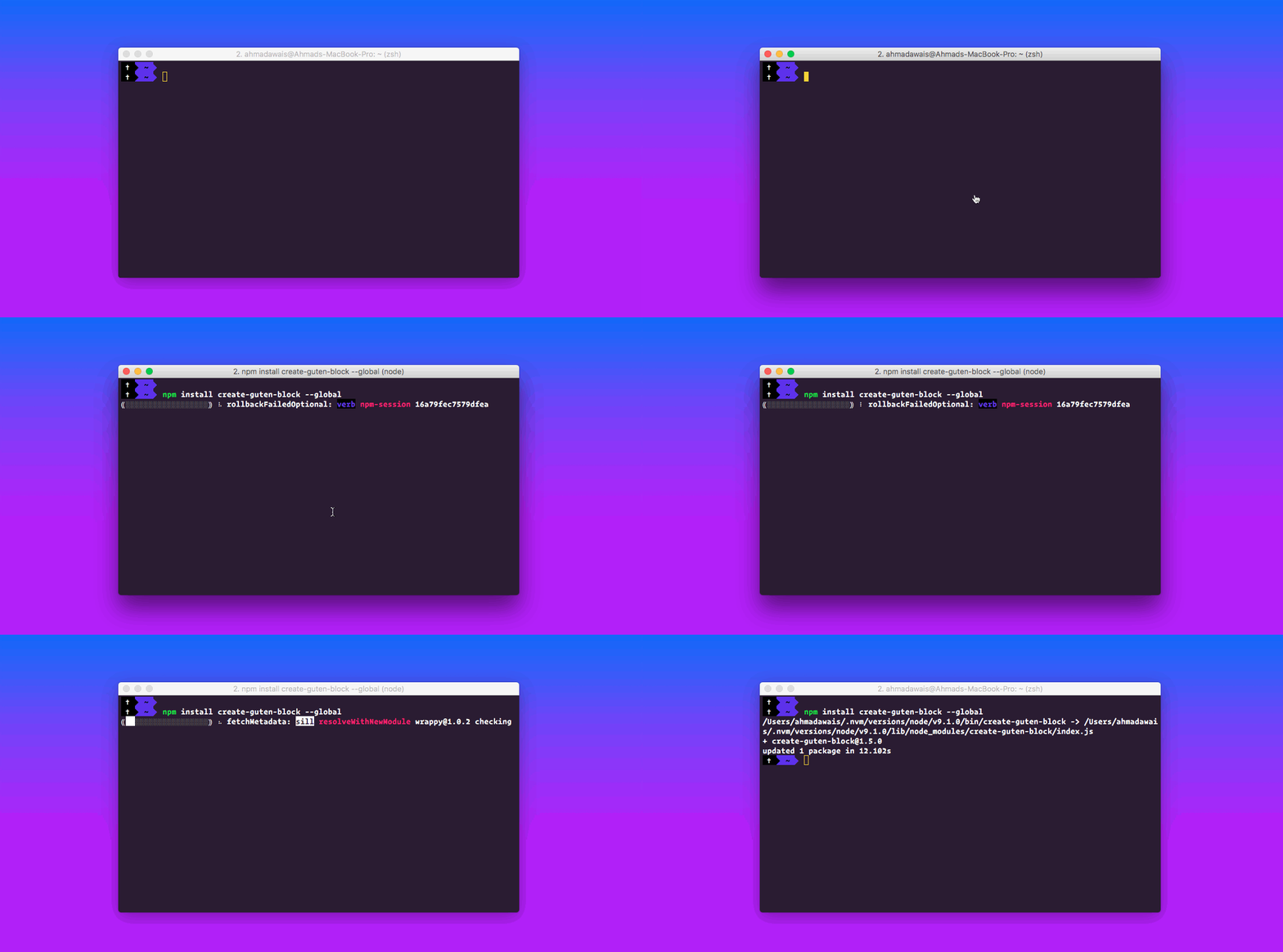
Hold on, it’ll take a couple of minutes to install.
→ STEP #2
Now all you have to do is create a Gutenberg block and start building. It’s done by running the create-guten-block command and providing it with a unique name for a WordPress plugin that will get created. The name can a single word or hyphenated multiple words.
Now let’s run the following command.
create-guten-block my-block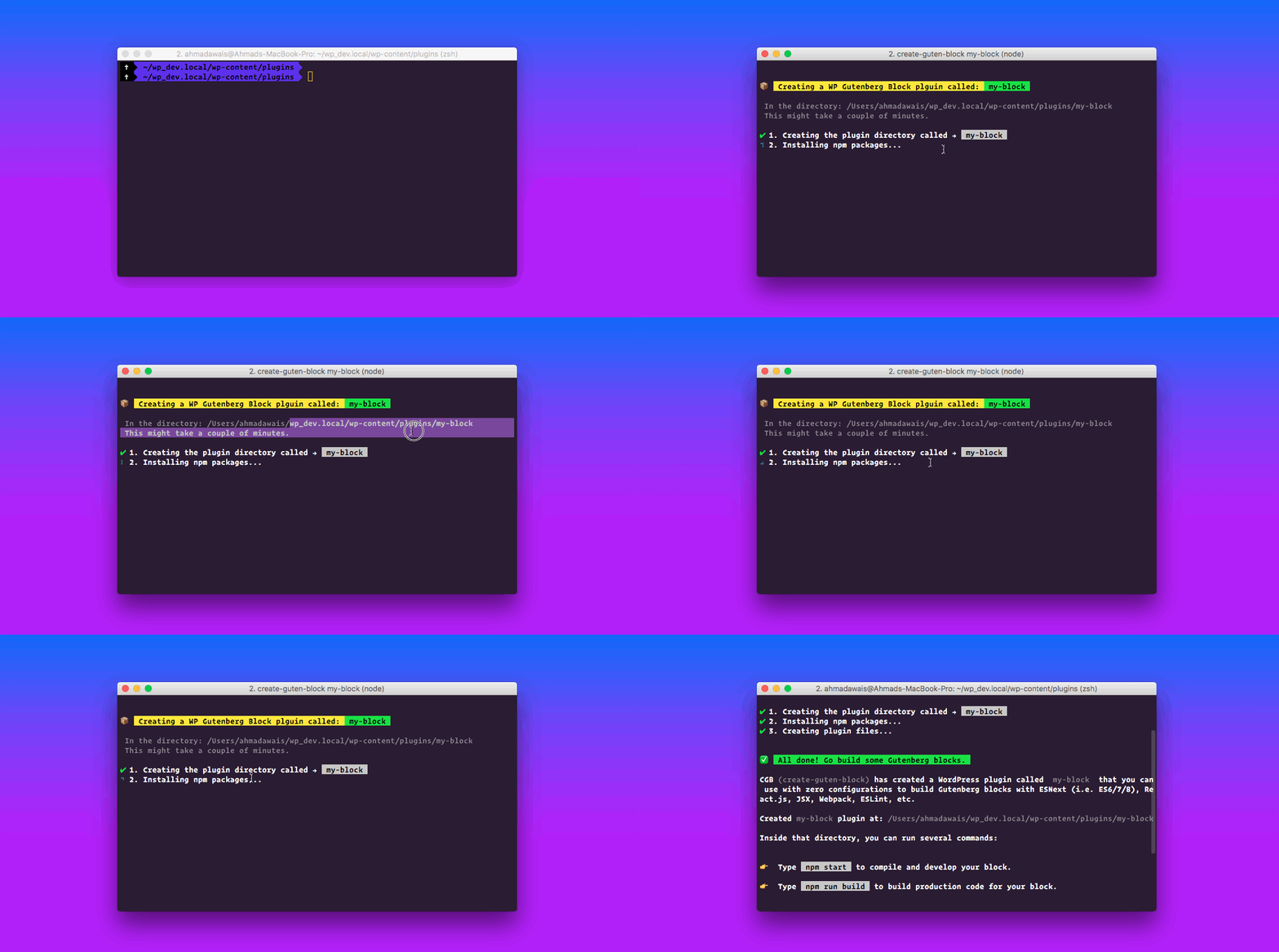
It will create a directory called my-block inside the current folder. Inside that directory, it will generate the initial project structure and install the transitive dependencies:
INSIDE: /local_dev_site.tld/wp-content/plugins/my-block

├── plugin.php
├── package.json
├── README.md
|
├── dist
|  ├── blocks.build.js
|  ├── blocks.editor.build.css
|  └── blocks.style.build.css
|
└── src
   ├── block
   |  ├── block.js
   |  ├── editor.scss
   |  └── style.scss
   |
   ├── blocks.js
   ├── common.scss
   └── init.php
No configuration or complicated folder structures, just the files you need to build your app.
→ STEP #3
Once the installation is done, you can open your project folder and run the start script.
Let’s do that.
cd my-block
npm start
You can also use yarn start if that’s your jam.
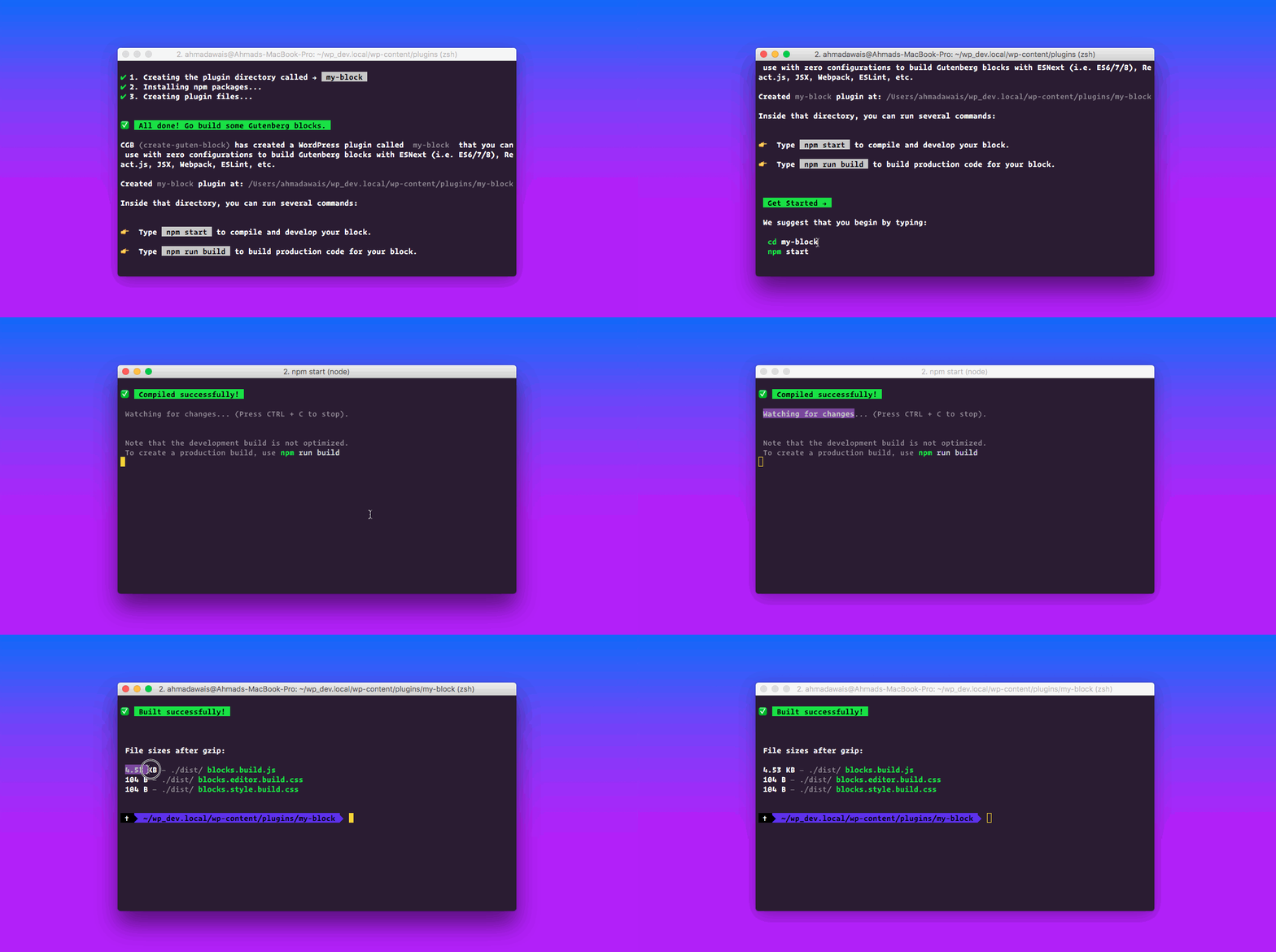
This runs the plugin in development mode. To produce production code run npm run build. You will see the build messages, errors, and lint warnings in the console.

Workflow!
There are just three scripts that you can use in your create-guten-block workflow. With these three scripts, you can develop, build, and eject your plugin.
👉 npm start
- Use to compile and run the block in development mode.
- Watches for any changes and reports back any errors in your code.
👉 npm run build
- Use to build production code for your block inside
distfolder. - Runs once and reports back the gzip file sizes of the produced code.
👉 npm run eject
- Use to eject your plugin out of
create-guten-block. - Provides all the configurations so you can customize the project as you want.
- It’s a one-way street,
ejectand you have to maintain everything yourself. - You don’t normally have to
ejecta project because by ejecting you lose the connection withcreate-guten-blockand from there onwards you have to update and maintain all the dependencies on your own.
That’s about it.

TL;DR
Too long, didn’t read? Here’s a shorter version.
Open the terminal app and run the following commands.
- ✅ Install/Update:
npm install create-guten-block --global - 🔰 Create:
create-guten-block my-block— Run inside local WP install E.g./wp.local/wp-content/plugins/directory. - 📂 Browse:
cd my-block— Open the newly created plugin directory. - ♻️ Run:
npm start— For development. - 📦 Run:
npm run build— For production build. - ⏏ Run:
npm run eject— To customize, update, and maintain all by yourself.
Create-Guten-Block has been tested to work on macOS, but must also work on Windows, and Linux. If something doesn’t work, kindly file an issue →

Updating to New Releases
Create Guten Block is divided into two packages:
create-guten-blockis a global command-line utility that you use to create new WP Gutenberg plugins.cgb-scriptsis a development dependency in the generated plugin projects.
npm install create-guten-block --globalYou almost never need to update create-guten-block itself: it delegates all the setup to cgb-scripts. But as this project matures, there might be a few changes over time and you can re-run the global install.
When you run create-guten-block, it always creates the project with the latest version of cgb-scripts so you’ll get all the new features and improvements in newly created plugins automatically.
✅ To update an existing project to a new version of cgb-scripts, open the changelog, find the version you’re currently on (check package.json in your plugin’s folder if you’re not sure), and apply the migration instructions for the newer versions.
🔰 In most cases bumping the cgb-scripts version in the package.json and running npm install in this folder should be enough, but it’s good to consult the changelog for potential breaking changes.
We commit to keeping the breaking changes minimal so you can upgrade cgb-scripts painlessly.

Changelog
Read what’s 📦 new, 👌 improved, 🐛 fixed, and if 📖 docs got updated.
👉 Go read the entire changelog at this link — CGB Changelog →
Nothing’s ever complete, so bear with us while we keep iterating towards a better future.
'Coz every night I lie in bed
The brightest colors fill my head
A million dreams are keeping me awake
I think of what the world could be
A vision of the one I see
A million dreams is all it's gonna take
A million dreams for the world we're gonna make ...
… listen to → A million dreams!

Hello, we’re the WordPress Couple!
I (Ahmad Awais) am a Full Stack Web Developer and a regular core contributor at WordPress. My significant other (Maedah Batool) is a Technical Project Manager, and she’s also a WordPress Core Contributor. Together with our team, we run the TheDevCouple.com.
If you’d like to get insights into our love for open source software, professional full stack development, WordPress community, the growth of JavaScript or growing a family, building, and bootstrapping a business, then subscribe to our premium newsletter called ↣ The WordPress Takeaway!
Support our Open Source Projects! 🎩
If you’d like us to keep producing professional free and open source software (FOSS). Consider paying for an hour of my dev-time. We’ll spend two hours on open source for each contribution. Yeah, that’s right, you pay for one hour and get both of us to spend an hour as a thank you.

Project Backers & WPCouple Partners ⚡️
This FOSS (free and open source software) project is built, updated and maintained with the help of awesome businesses listed below. Without the support from these amazing companies/individuals, this project would not have been possible. Make sure you check out their awesome services and products. They’ve earned it. 🎖
— What/How? Read more about it →

License & Attribution
MIT © Ahmad Awais.
This project is inspired by the work of more people than I could mention here. But thank you, Dan Abramov for Create React App, Andrew Clark, Sophie Alpert from React.js team, Wes Bos for awesome courses for React, ES6, and Node beginners. Kent C. Dodds for his open source evangelism, WordPress Core Contributors, Gary for keeping everyone sane, Gutenberg developers Matias, Riad, Andrew, Joen, Greg and contributors, and other WordPress community members like Zac for his course on Gutenberg, and also my friend Morten for all the #Guten-motivation, Icons8 for the awesome icons, Maedah for managing this project, and to everyone I forgot.

What’s Next?
Yes, that’s not all done, yet. I have managed to change the codebase and release many updates by now, before actually announcing a stable release.
The next step is to get this toolkit tested and mature the entire app to release version 2.0.0 for that not only do I need your support, I ask that you hop on board and contribute — that’s the only way forward.
I have created a GitHub issue with the title of 🚀 Creat Guten Block 2.0 Goals + Call for Contributors! In there I have listed a rough roadmap to version 2.0.0.
Goals listed below — without any order of priority:
- 🎖 At the time of writing,
create-guten-blockand sister scripts have received 3,000+ downloads - 💯 Get folks on React, Webpack, and Babel teams to review the configurations for best possible results
- ⚡️ Go beyond React — with Preact, Inferno, Marko, Angular, Vue, etc. JavaScript frameworks
- 📖 More examples need to be documented. Especially a Multi-block example which is easy
- 🔰 Babel 7, Webpack 4, upgrades to follow in the next major version of create-guten-block
- 🚧 ESLint integration needs a refresher — ESLint + Prettier setup is already WIP
- ⛓ Refactor code into small modules and maybe make small npm packages
- 📑 Improve inline documentation throughout the codebase
- 💎 Build more
cgb-dev-utils— separation of concerns - 📤 Possible integrations: Service Workers from Google
- 📣 Possible integrations: Progressive Web Apps
- 👻
.envfile limited set of customizations - 🤓 Allow custom forks of
cgb-scripts - 🛠 Improve the entire Webpack defaults
- 🗃 Webpack file handling done right
- 📹 Webpack image optimization
- 👹 Webpack Uglify ES6 plugin
- ⚙ Webpack + BrowserSync
- 🔰 Multi Block Examples
- 💠 Automated test suit
- 🤔 Other stuff? #Suggest
- 🙌 PR’s welcomed
What do you say? Comment below. And make sure you’ve stargazed 🌟 the GitHub repo for updates!
🙌
Building create-guten-block was a lot of work. It’s easily one of the best software I’ve written and I have exciting improvements coming.
🔥 It would mean the world to me if you Tweet about it, try it out, and contribute.
Peace! ✌️
Feel free to reach out and say 👋 on Twitter @MrAhmadAwais

UPDATES
- 🚀
create-guten-blockhas gone viral 100+ stargazers on GitHub - 🙌 Woot! Woot! The project is trending on GitHub JavaScript repos today
- 😇 Humbled to be listed as a trending developer on GitHub today — this is crazy!
- 🔥 Holly Molly —
create-guten-blockis now trending in all languages overall on GitHub!
TheDevCouple

AHMAD AWAIS
Developer edutainer: NodeCLI.com · VSCode.pro
Ahmad Awais is an award-winning open-source engineer, Head of Developer Relations at RapidAPI, Google Developers Expert Dev Advocate, Node.js Community Committee Outreach Lead, WordPress Core Dev, and ex VP of Engineering at WGA. He has authored various open-source software tools used by millions of developers worldwide, like his Shades of Purple code-theme or projects like the corona-cli.
Say Hi to him on Twitter — @MrAhmadAwais.

MAEDAH BATOOL
Developer Content Manager: Writy.io
Maedah Batool is an official WordPress Marketing Team Representative, a WordPress Core Contributor, Technical Content Manager and Director of Developer Content at WGA. She created a tech-training startup called FinkTanks where she has taught 7,500+ girls how to code with WordPress, Next.js, React, and more. After FinkTanks was acquired she took a role in DevRel as a Technical Content Manager.
Say Hi to her on Twitter — @MaedahBatool.
🙌
SUBSCRIBE TO DEVELOPERS TAKEAWAY!
A Premium Development Newsletter by TheDevCouple! What is TheDevTakeaway?

Meet Ameer Dagha the man behind ReviewsPK
Read Article
Rank Math Plugin For Your SEO Needs
Read Article